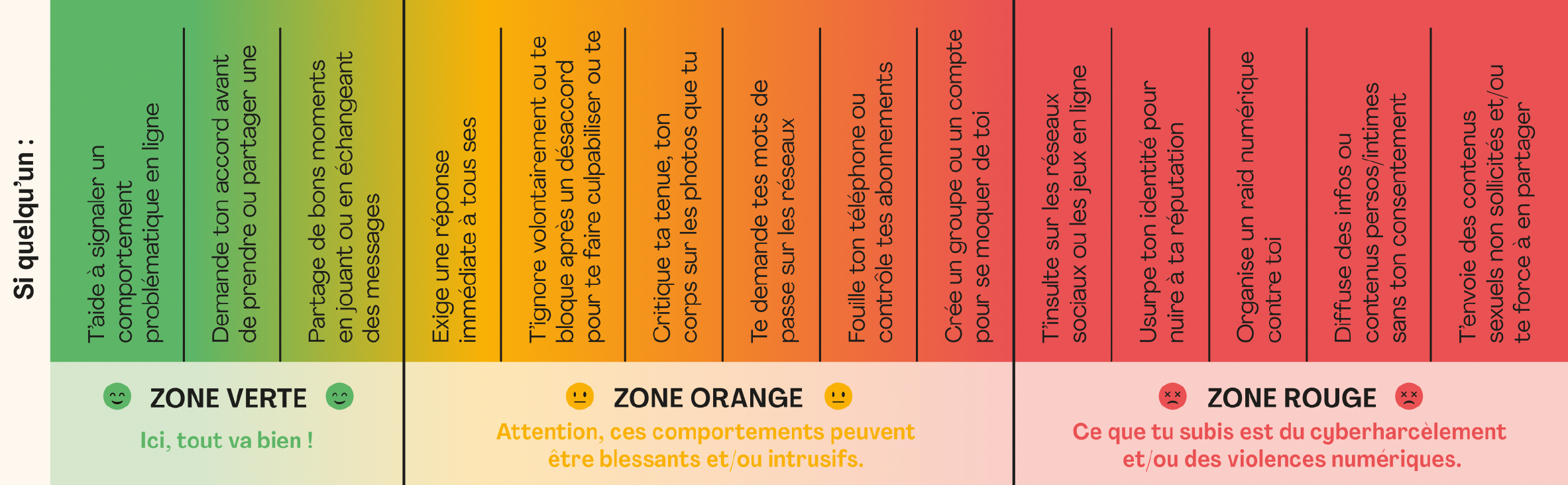
The Cyberharcèlomètre, a tool created by the Association e-Enfance / 3018, helps you to put into words what you are experiencing and how to act accordingly, thanks to 3 zones: green, orange and red.
It is aimed primarily at secondary school students, but can also be used by parents and professionals to discuss issues with young people.
1/Read the situation and identify your zone Go through the behaviours on offer and mark the coloured zone (green, orange or red) you are in.
2/ Ask yourself if you feel comfortable Listen to how you feel. If the situation makes you feel uncomfortable, frightened or in pain, this is an important signal, so don't trivialise it.
3/ Talk to a trusted adult if you have any doubts A parent, a teacher, a counsellor, a health professional... You don't have to deal with this alone. Talking is already acting.
4/ In a red zone or if you are in pain, contact 3018 Whether it's for you or to help someone else, 3018 is there 7 days a week from 9am to 11pm. Free, anonymous and confidential, you can reach it by telephone or by chat via the App 3018 or on 3018.co.uk
Good to know: If you are at the root of one of the behaviours in the orange or red zones, 3018 can help you understand and act differently.
Parents and professionals, this tool is for you too!
Parents: open up the dialogue and react appropriately
Open dialog :
Consult the tool with your child to talk together about what he or she is experiencing
Use the zones and examples as a starting point for conversation
Don't downplay it: an orange zone already deserves your attention
Reacting appropriately :
In the orange zone: reassure, set limits and help them to set them, provide support
In a red zone: call 3018 for help with your procedures
Always retain digital evidence, without modifying it, before making any reports
Always remind your child that it's not their fault
Professionals: raise awareness and support your young people
Running an awareness-raising session :
Project the cyberharometer, hiding situations to launch a discussion
Classify situations in the 3 zones
Find out where the situations are and discuss them together
Combine the presentation of this tool with a presentation of 3018.
Good to know: the Association e-Enfance / 3018 organises awareness-raising workshops for primary and secondary schools. Find out more here, click here.
Supporting a young person in difficulty :
Use the Cyberharometer as a tool for discussion with young people and their families
Help to quickly identify a situation reported by a young person
Orient the young person according to the area identified
Incorporate the tool into your prevention materials